
Why Localizing Your Screenshots Beats Localizing Your Keywords (And How to Ship 10 Locales in an Afternoon)
Most teams translate their keyword field and call it localized. Screenshot localization moves install rate 2-5x more than keyword localization in non-English markets.
Quick answer: Localizing your screenshots lifts install rate 2–5x in non-English markets, far more than translating your keyword field, which users never see. The install decision is made entirely from visible elements (title, subtitle, screenshots), so translated captions plus localized layout matter more than hidden keyword translation. Fully localized listings also rank higher in their storefronts. Real localization means caption translation plus text expansion/contraction (German runs 30–40% longer), RTL flipping for Arabic/Hebrew/Farsi, and cultural visual cues. AI tools like SnapMonk can produce a 10-locale set in an afternoon instead of a multi-week design project.
There's a lazy version of app store localization that every team does at least once. Translate the keyword field, translate the description, ship it.
The harder version is actually localizing the screenshots. That's where the install lift hides. And it's exactly the part most teams skip, because shipping a separate screenshot set per locale historically meant a separate design project per locale.
Why localization matters at all
Start with the size of the thing. English speakers are a minority of the people browsing app stores. The App Store and Google Play together serve users across more than 150 countries, and most downloads and most revenue come from non-English-speaking markets: Japan, Korea, Germany, France, Brazil, China, India. If your listing only speaks English, you're asking the rest of the planet to install an app that visibly wasn't built for them.
That's the part teams underrate. The install decision isn't a careful, rational one. It's a trust call made in a few seconds. A user scrolling their local App Store sees a row of screenshots and decides, almost instantly, whether this app is "for them." Captions in their own language are the single strongest signal that it is. English captions on a Japanese listing read as "made for someone else," and people don't install apps that weren't made for them.
Language is also a discoverability lever, not only a trust one. A listing fully localized for a market ranks higher in that market's store. Higher rank means more impressions, more impressions mean more installs, and more installs mean better rank. Every locale you ship is a new front door, and that door opens wider the more of the listing is actually in the local language.
Here's what that looks like over time on a real app. Revenue sat flat around €100 a month, then localization went live and it climbed past €300 as new-language markets started converting:
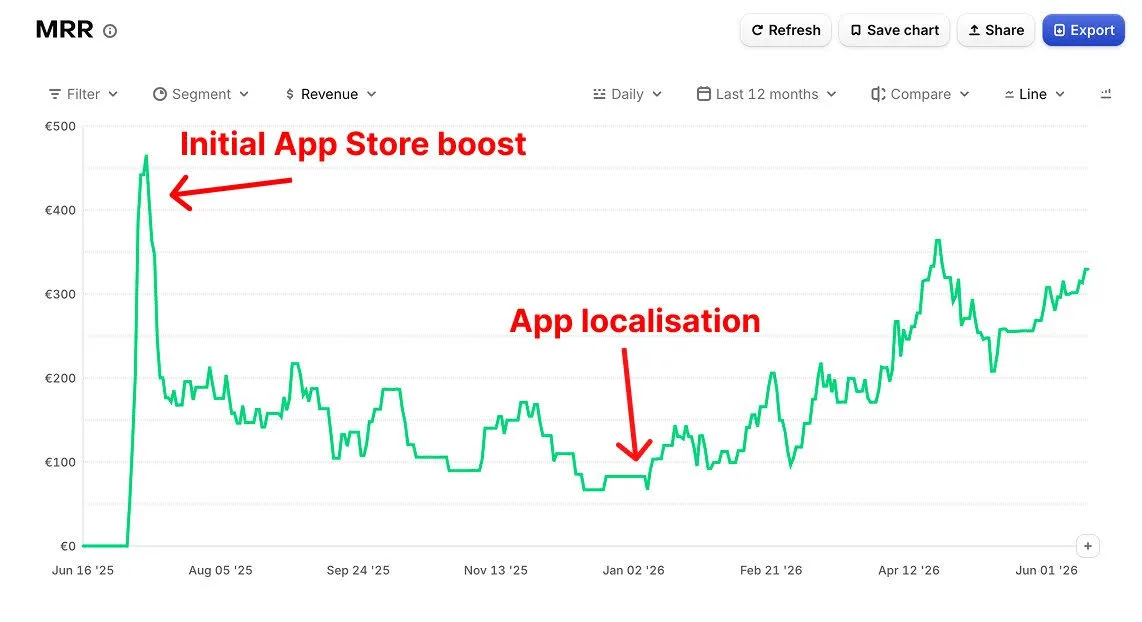
The first spike is the initial App Store launch boost, the kind every app gets and then gives back. The second climb, the durable one, starts at app localization. That's the whole difference between a one-time launch bump and a compounding install channel: localization is the part that keeps paying out, because each new locale turns a market that was installing at near zero into one that converts.
So the case for creating locales in different languages is simple. Every language you skip is a market you've decided to be invisible and untrustworthy in. Localization is how one app becomes installable in ten countries instead of one.
The data
We haven't run a formal study on this. But the pattern is consistent across every Japanese, Korean, and German app we've looked at:
- Apps with translated metadata but English screenshots: marginal install lift in non-English markets, often within noise
- Apps with translated metadata AND localized screenshots: 2–5x install rate compared to an English-screenshots baseline in the same locale
This isn't subtle. It also isn't surprising. If a user lands on a Japanese App Store listing and sees English captions in the screenshots, they reasonably assume the app isn't really for them.
Why screenshots beat keywords
Two reasons.
First, screenshots are visible and keywords aren't. The 100-char keyword field on iOS is private. A user in Japan never sees it. Their decision to install is made entirely from what they can see: the title, subtitle, screenshots, and video. If those are in their language, conversion lifts. If not, it doesn't.
Second, Apple and Google both rank localized listings higher in their respective storefronts. A listing fully localized for ja-JP, screenshots included, ranks higher in Japan's App Store than a listing with translated metadata but English screenshots. This compounds. Better rank means more impressions, which means more installs, which means better rank.
What "localized screenshots" actually means
Not just translation. Real localization covers:
- Caption translation, the obvious one
- Text expansion and contraction. German captions are typically 30–40% longer than English, Japanese is often shorter, Korean sits in between. Layouts that work in English break in German.
- RTL handling. Arabic, Hebrew, and Farsi reverse the reading direction. UI mockups inside the screenshot need to flip too, not just the captions.
- Cultural visual cues: color expectations (red is lucky in China, alarming in the US), trust signals (different in Japan vs Germany), payment-UI screenshots (Pix in Brazil, UPI in India)
- Number formatting: date formats, decimal separators, currency symbols inside any UI mockups
A "translated" screenshot misses everything except the first item. A "localized" screenshot handles all of them.
For the country-by-country breakdown (Japan, Germany, Brazil, India, Korea, and more) see our localization market guides.
The production bottleneck
Translation is the easy part. The hard part is producing a separate visual layout per locale that respects text expansion, RTL, and cultural conventions, for every screenshot in every locale.
The naive approach is to pay a designer per locale, per screenshot. The cost is massive and it takes weeks per locale.
The approach that actually scales is to generate one master design, then produce locale variants from it automatically. Translation and layout adjustment in one pass.
SnapMonk does this directly. The editor has a TranslatePanel that takes your English master, runs the caption text through Gemini for context-aware translation, and produces a locale variant with adjusted text layout. RTL flipped if needed, expanded or contracted to fit the same frame. It's an all-in-one app growth platform, so the plan that localizes your screenshots also covers ASO keyword research and rank tracking per market, without a separate keyword tool.
We store the per-locale variants in design_variants alongside the master, so re-exporting a locale or fixing a typo doesn't mean regenerating the rest.
A realistic afternoon's work
Here's the actual flow for shipping 10 locales of a 5-frame screenshot set.
Ship the English master first. Get the en-US set looking right. Captions, layout, color, framing, all dialed.
Then open the TranslatePanel and pick your locales. A common starter set: ja-JP, ko-KR, de-DE, fr-FR, es-ES, pt-BR, it-IT, nl-NL, id-ID, hi-IN. Ten locales covers roughly 80% of high-revenue non-English markets.
Let the AI translate. About 30 seconds per locale for caption translation plus layout adjustment.
Now review the per-locale previews. This is the step teams skip and then regret. AI translation is good but not perfect. Look at the de-DE variant for text overflow specifically, because German almost always pushes the layout. If you target MENA, check the ar/he/fa variants for RTL correctness.
Tweak the variants that need it. Override individual captions if a translation didn't land. Drop the font size on the German variant if the layout broke.
Then export per-locale ZIPs. Each one drops into App Store Connect or Play Console at the right locale.
The whole thing takes under an afternoon for 10 locales. That used to be a multi-week design project.
Languages that need extra attention
Some locales have characteristics that catch generic translation workflows off guard:
- German: text is 30–40% longer. Layouts designed at English text length will overflow.
- Japanese: text is shorter, but vertical text and full-width punctuation can break alignment if the design uses Latin-spec margins.
- Arabic, Hebrew, Farsi: RTL. The entire layout flips, not just the text.
- Chinese (Simplified vs Traditional): different markets, different conventions. Don't ship one for both.
- Korean: text length is medium but line-break behavior differs from English. Manual review pays off.
We have language-specific guides for each of the major locales. See the localization hub for per-language considerations.
The bigger picture
Localization is the ASO move with the most upside that most teams don't make. Not because they don't know it works. They do. It's because the production cost has historically been prohibitive.
AI-generated screenshot variants change that math. If you can ship a localized set in an afternoon instead of a quarter, localization stops being a strategic decision and becomes the default.
Open the AI engine → · Read the localization guide → · Country-by-country breakdowns →
FAQ
Does localizing screenshots actually increase installs? Yes. Apps with translated metadata and localized screenshots see roughly 2–5x the install rate of an English-screenshots baseline in the same non-English market, far more lift than translating the keyword field alone.
Why are localized screenshots more important than localized keywords? The iOS keyword field is private, so users never see it. Their install decision comes entirely from visible elements like the title, subtitle, and screenshots. Localizing what they can see is what moves conversion.
What does localizing a screenshot involve beyond translation? Caption translation plus layout adjustment. German text runs 30–40% longer and can overflow, Japanese is shorter, RTL languages (Arabic, Hebrew, Farsi) flip the whole layout, and cultural cues like color and payment UI may need to change.
How long does it take to localize a screenshot set? With AI translation and per-locale variants, you can ship around 10 locales of a 5-frame set in an afternoon. Roughly 30 seconds of translation per locale plus review, versus the multi-week design project it used to require.
Related reading
- SnapMonk vs Canva for app store screenshots: why localization is the cleanest differentiator
- SnapMonk vs AppLaunchpad: auto-localization vs manual per-locale duplication
- SnapMonk vs Figma templates: design control vs localized generation
- Best app store screenshot tools for indie developers: full roundup
Keep reading
How to A/B Test App Store Screenshots With AI-Generated Variants
Apple PPO and Google Play Experiments let you test up to 3 screenshot variants against your live listing. The bottleneck isn't the platforms. It's producing variants fast enough to actually run experiments.
Read articleWhat Top App Listings Get Right About Screenshots (And What Most Get Wrong)
We went through dozens of top App Store and Play Store listings to see what patterns their screenshots follow. The playbook is narrower than you'd think.
Read articleASO Split Testing: How to Run an App Store Screenshot Test Without Leaving Your Screenshot Tool
The practical loop for split testing App Store screenshots: pick one change, compare it against your live page, send it to Apple as a product page test, and read the before/after in your listing conversion. Now possible end to end from SnapMonk.
Read articleReady to AI-generate your app screenshots?
Describe your app, get store-ready visuals in seconds. Try SnapMonk free — no signup required.
Try the AI Engine